
Introduction
Most Sales Cloud pipelines don’t fail because they’re missing features.
They fail because they’re designed for reporting, not for selling.
On paper, everything looks right. Stages are defined. Dashboards are built. Forecasts exist. But in reality, sales reps skip stages, update fields at the last minute, and track deals outside Salesforce. Not because they’re lazy — but because the pipeline doesn’t help them make better decisions.
This is where most sales cloud pipeline setup efforts go wrong.
Teams build pipelines based on what leadership wants to see, not on how deals actually move. The result is a CRM that looks organized but feels disconnected from day-to-day selling. Adoption drops quietly, and trust in the data erodes over time.
The good news is this isn’t a tooling problem. It’s a design problem.
When pipeline stages are aligned with real sales behavior — clear actions, clear exit criteria, and minimal friction — Sales Cloud becomes something reps rely on, not something they tolerate. That’s what this guide is about.
Why Most Sales Cloud Pipelines Look Right but Don’t Work
At a glance, many pipelines appear clean and logical. Stage names sound professional. Every deal has a place. Reports roll up neatly. Yet when you look closer, usage tells a different story.
Deals stall in the same stages for weeks. Reps jump straight to late-stage statuses. Forecast calls turn into debates instead of decisions. Managers question the numbers, and reps stop taking the pipeline seriously.
This happens because the pipeline was never designed around how sales conversations progress in the real world.
In many Sales Cloud setups, stages are created to satisfy internal reporting needs rather than guide selling behavior. There’s no clear definition of what needs to happen before a deal moves forward. Progress is assumed, not earned. Over time, the pipeline becomes a formality instead of a tool.
That disconnect is the root cause of most adoption issues — and it starts at setup.
The Difference Between a Reporting Pipeline and a Selling Pipeline
Most Sales Cloud pipelines are built with good intentions. Leadership wants visibility. Operations wants consistency. Finance wants predictability. So the pipeline gets designed to answer reporting questions first.
The problem is simple.
Sales reps do not sell to dashboards.
A reporting focused pipeline is optimized for management comfort.
A selling focused pipeline is optimized for rep decision making.
That difference changes everything.
Here is a clear comparison so the gap is obvious.
Reporting Pipeline vs Selling Pipeline
| Reporting Pipeline | Selling Pipeline |
|---|---|
| Built for forecasts and dashboards | Built for daily rep decisions |
| Stage names sound formal | Stage names reflect real actions |
| Progress is assumed | Progress is proven |
| Fields are filled for compliance | Fields exist to guide next steps |
| Reps update late or inconsistently | Reps update because it helps them |
| Managers question the data | Managers trust the pipeline |
When pipelines are built mainly for reporting, reps treat them like paperwork.
When pipelines are built for selling, reps treat them like a tool.
That is the shift most teams miss during sales cloud pipeline setup.
What Sales Reps Actually Need From a Pipeline
Sales reps do not need more fields.
They do not need more stages.
They do not need more automation.
They need clarity.
A pipeline should answer three questions for a rep at any moment.
What stage am I really in
What needs to happen to move forward
What risk exists right now
If the pipeline cannot answer those questions quickly, it gets ignored.
Most adoption issues come from pipelines that create friction instead of focus. Too many required fields too early. Stages that do not match how customers decide. Rules that feel arbitrary.
When this happens, reps find workarounds. Notes go into personal docs. Deals get tracked mentally. Salesforce becomes something they update for management, not for themselves.
A strong sales cloud pipeline setup removes that friction. It makes the next action obvious and the consequences visible.
How to Design Pipeline Stages That Reps Do Not Ignore
Pipeline stages should represent customer progress, not internal hope.
That means stages should move only when something meaningful happens in the deal. Not when a rep feels optimistic. Not when a meeting is scheduled. Not when time passes.
Good pipeline design starts before Salesforce configuration.
You define what actually changes between stages. A confirmed problem. A validated budget range. A real decision maker involved. A clear buying timeline.
Only then do you translate that into Sales Cloud.
When stages have clear entry and exit criteria, reps understand why a deal is where it is. Managers stop chasing updates. Forecast conversations improve because everyone is looking at the same reality.
This is where many implementations go wrong. Teams configure first and think later. The pipeline looks complete, but it has no spine.
Design first. Configure second.
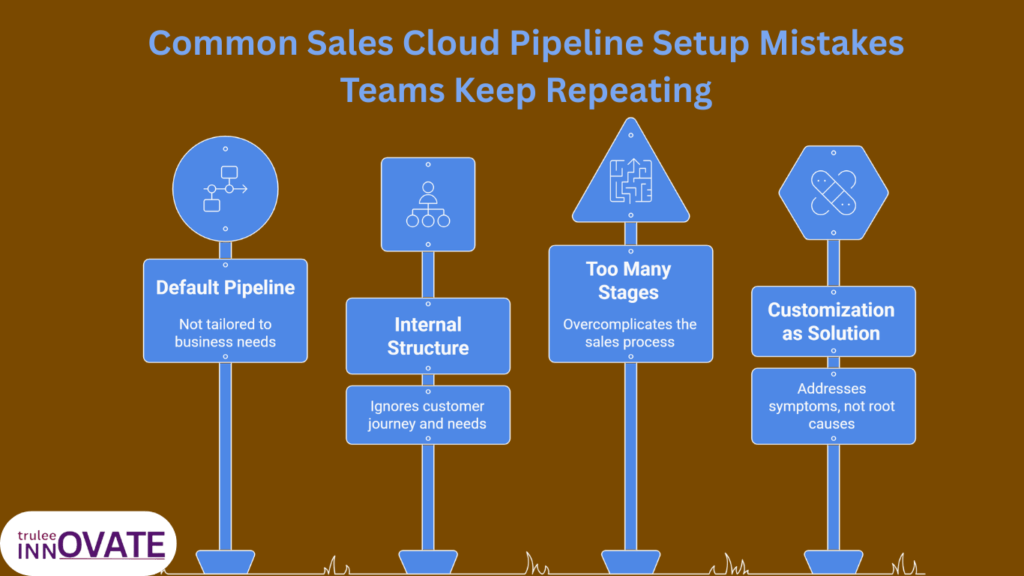
Common Sales Cloud Pipeline Setup Mistakes Teams Keep Repeating
These mistakes show up across startups, SMBs, and large enterprises. Different size. Same patterns.
The problem is not lack of effort. It is misplaced focus.
Copying the default Salesforce pipeline
Many teams start with the default pipeline stages and make minor tweaks. This feels safe and fast. It is also risky.
Default stages are generic. They are not designed for your sales motion, your deal size, or your buyer behavior. When teams copy them, reps end up forcing deals into stages that do not reflect reality.
The pipeline looks familiar. The data looks acceptable. But usage never feels natural.
Designing the pipeline around internal structure
Some pipelines mirror how the company is organized instead of how customers buy.
Stages reflect departments, approvals, or internal handoffs. Sales reps then have to translate customer progress into internal language. That translation creates friction and slows updates.
A pipeline should follow the buyer journey, not the org chart.
Adding too many stages too early
Complex pipelines are often created to handle every possible scenario from day one.
This overwhelms reps. Early stages become confusing. Deals stall because it is unclear where they belong.
Strong pipelines start simple. Complexity is added later, only when patterns are clear.
Treating customization as the solution
Customization feels productive. Fields. Validation rules. Automation.
But customization does not fix unclear thinking.
When the underlying sales process is fuzzy, more configuration only hides the problem. Reps comply briefly, then revert to old habits.
A clean sales cloud pipeline setup relies more on clarity than on features.
Many of these pipeline issues are not isolated mistakes. They are usually symptoms of deeper implementation decisions made early in the rollout. We have covered the most common Sales Cloud implementation failures and why they tend to surface within the first 90 days in detail here.
How a Well Designed Pipeline Changes Sales Behavior
When a pipeline is designed correctly, behavior shifts without enforcement.
Reps update stages earlier because it helps them plan next steps. Forecast conversations become calmer because surprises decrease. Managers coach based on signals, not assumptions.
Most importantly, trust returns.
Sales Cloud stops feeling like a reporting system and starts functioning as a shared source of truth. Reps and leaders stop arguing about data and start discussing decisions.
This is the real outcome of good pipeline design. Not prettier dashboards. Better conversations.
Final Thoughts
A Sales Cloud pipeline does not fail because teams lack effort or tools. It fails when design decisions are made without understanding how deals actually move.
When pipelines are built for reporting first, reps adapt around them instead of working within them. Adoption drops quietly. Data loses meaning. And leadership ends up managing exceptions instead of outcomes.
A strong sales cloud pipeline setup does the opposite. It removes guesswork. It makes progress visible. It helps reps decide what to do next without forcing compliance.
This kind of pipeline is not built through heavy customization. It is built through clarity, restraint, and an honest look at how your sales process really works.
If you are setting up Sales Cloud for the first time or trying to fix a pipeline that no longer reflects reality, this is the stage where experience matters more than features.
You can see how we approach Salesforce implementations at TruleeInnovate here:
Salesforce services
No pressure. Just a better way to think about building pipelines that people actually use.
FAQ’s
1. What is a Sales Cloud pipeline setup?
A Sales Cloud pipeline setup is the process of designing deal stages, rules, and visibility in Salesforce so they reflect how sales conversations actually progress. It is not just configuration. It starts with defining the sales process first and then mapping it into Sales Cloud.
2. Why do sales reps avoid using the Salesforce pipeline?
Sales reps avoid pipelines when stages feel artificial, fields are required too early, or updates do not help them move deals forward. When a pipeline is built mainly for reporting, reps see it as administrative work rather than a selling tool.
3. How many pipeline stages should a Sales Cloud setup have?
Most effective Sales Cloud pipelines have fewer stages than teams expect. Early stages should be minimal and clearly defined. Too many stages create confusion and slow adoption. It is better to start simple and expand only when patterns are clear.
4. Should pipeline stages be the same for all sales teams?
Not always. Different sales motions often need different pipelines. High velocity inside sales and complex enterprise deals usually require different stage logic. The key is consistency within each motion, not forcing one pipeline for everyone.
5. Can a poorly designed Sales Cloud pipeline be fixed later?
Yes, but it requires more than technical changes. Fixing a poor pipeline setup usually involves revisiting the sales process, simplifying stages, retraining teams, and rebuilding trust in the CRM. Early design decisions are much easier to correct before habits form.