
Introduction
Sales Cloud implementation failures usually happen because teams focus on configuring the system before fixing their sales processes. Poor data quality, weak user adoption, and unclear pipeline structures often cause problems within the first 90 days.
Sales Cloud implementations don’t usually fail because the tool is weak. They fail because teams rush into configuration without fixing how selling actually happens.
In the first few weeks, everything looks fine. Dashboards load. Fields are created. Pipelines exist. But underneath, sales reps struggle, data quality drops, and leadership loses confidence. This is how most sales cloud implementation failures begin.
What makes it worse is that these problems show up early. In many teams, the first 90 days decide whether Sales Cloud becomes a trusted system or just another CRM no one wants to use.
The patterns are consistent. And they have very little to do with the technology itself.
What Causes Sales Cloud Implementation Failures
Most sales cloud implementation failures occur because the CRM is configured before the sales process is clearly defined. Early over-customization, poor user adoption design, inconsistent data practices, and missing success metrics in the first 90 days often cause Salesforce implementations to struggle.
The most common causes include:
• undefined sales process before configuration
• over-customizing Sales Cloud too early
• poor CRM adoption by sales teams
• lack of early success metrics and feedback loops
Why the First 90 Days Decide Sales Cloud Success
The early phase of a Sales Cloud implementation sets habits that are hard to reverse.
When teams launch without clarity, sales reps learn to work around the system instead of with it. They update records late, skip fields, or keep their own tracking outside the CRM. Once that behavior sets in, adoption becomes a constant battle.
Most sales cloud implementation failures can be traced back to this period. The focus is usually on building everything quickly instead of building the right things first. Processes are assumed instead of defined. Success is measured by go-live dates, not by whether sales teams actually trust the data.
The result is predictable. Sales Cloud goes live, but it never becomes the single source of truth it was meant to be.
Common Sales Cloud Implementation Failures in the First 90 Days
Many of the issues discussed above show up repeatedly in struggling implementations. While the details vary between organizations, the underlying causes behind most sales cloud implementation failures are surprisingly consistent during the first 90 days after go-live.
Implementing Sales Cloud Without a Defined Sales Process
This is the most common root cause behind sales cloud implementation failures, and it usually shows up before anyone notices something is wrong.
Teams assume their sales process is “obvious.”
It lives in people’s heads, not on paper.
Different reps qualify leads differently. Managers review deals based on instinct. Forecasts depend on who you ask.
Then Sales Cloud is implemented on top of that ambiguity.
At this point, Salesforce is forced to guess. Someone creates stages that sound right. Fields are added because they seem useful. Validation rules are built without agreement on what “ready” actually means.
The CRM ends up documenting confusion, not fixing it.
What teams usually do wrong at this stage
- They design stages before agreeing on exit criteria
- They treat Salesforce stages as reporting labels, not decision gates
- They confuse activity tracking with progress
- They expect the tool to standardize behavior automatically
Sales Cloud is powerful, but it does not invent a sales process for you. It only enforces the one you give it.
When that process is unclear, reps experience the CRM as friction instead of support. That’s when adoption drops and workarounds begin.
Where the disconnect becomes visible
This gap between how sales actually happens and how Sales Cloud is configured shows up in very specific ways.
Here’s a simple comparison that reflects what we see repeatedly in struggling implementations:
| Sales Process Before CRM | After a Poor Sales Cloud Implementation |
|---|---|
| Reps qualify leads informally | Leads move through stages inconsistently |
| Deals progress based on judgement | Stages change without real progress |
| Managers rely on experience | Dashboards show misleading confidence |
| Forecast discussions are collaborative | Forecast numbers lose credibility |
This is not a technology problem.
It’s a translation problem.
Sales Cloud is being asked to reflect a process that was never clearly defined in the first place.
Why this leads to early failure
In the first 90 days, teams are supposed to build trust in the system. But when the CRM doesn’t match how reps sell, that trust never forms.
Salespeople feel monitored instead of supported.
Managers stop believing the numbers.
Leadership starts asking for reports outside the system.
At that point, the implementation hasn’t failed visibly yet, but it’s already off track.
Most sales cloud implementation failures don’t happen in a dramatic moment. They happen quietly, when the CRM becomes optional.
What should happen instead (without turning this into a sales pitch)
Before configuring stages, fields, or automation, teams need to answer a few uncomfortable questions:
- What actually moves a deal forward in our sales cycle?
- What information is essential at each stage and why?
- Where do deals usually stall and for what reason?
When those answers are clear, Sales Cloud becomes a mirror of reality instead of a forced process.
And when Sales Cloud reflects reality, adoption follows naturally.
Over-Customizing Sales Cloud Too Early
Once the basic setup is live, teams often feel pressure to “finish” the implementation. This is where over-customization creeps in.
More fields. More rules. More automation.
All added with good intentions.
The problem is timing.
In the early stages, Sales Cloud should reduce friction, not add layers to it. But many implementations do the opposite. They try to anticipate every edge case before the team has even used the system consistently.
This is a fast path to sales cloud implementation failures.
Why early customization backfires
At this stage, teams don’t yet know:
- which fields are truly necessary
- which reports actually get used
- where automation helps versus slows things down
Yet decisions are locked in anyway.
Reps open a record and see dozens of required fields.
Simple updates turn into multi-step tasks.
Automation fires before users understand why.
Instead of guiding behavior, the system starts policing it.
The hidden cost of “building everything at once”
Over-customization creates three quiet problems that compound over time:
- User resistance
Reps feel the CRM is designed for management, not for selling. They comply just enough to get by. - Admin overload
Small changes now require revisiting multiple workflows, validation rules, and dependencies. - False confidence
Leadership sees complex dashboards and assumes the system is mature, even when data quality is poor.
None of this shows up on launch day. It shows up weeks later, when usage starts slipping.
A simple way to think about early customization
Instead of asking:
What can Sales Cloud do?
Teams should ask:
What must Sales Cloud do right now to support selling?
A useful mental model in early implementations looks like this:
| First 90 Days Focus | What to Delay |
|---|---|
| Core pipeline stages | Advanced automation |
| Essential fields only | Nice-to-have data |
| Clear ownership rules | Complex approval flows |
| Basic reporting | Executive dashboards |
This approach keeps the system usable while giving teams time to learn what they actually need.
Why this matters more than most teams realize
Early Sales Cloud usage sets expectations. If reps experience the CRM as slow or rigid, they will never fully trust it later, even if improvements are made.
That’s why many teams describe Salesforce as “powerful but painful.”
The pain usually comes from choices made too early.
Avoiding over-customization doesn’t mean limiting capability.
It means sequencing it.
Why Sales Teams Don’t Adopt Sales Cloud
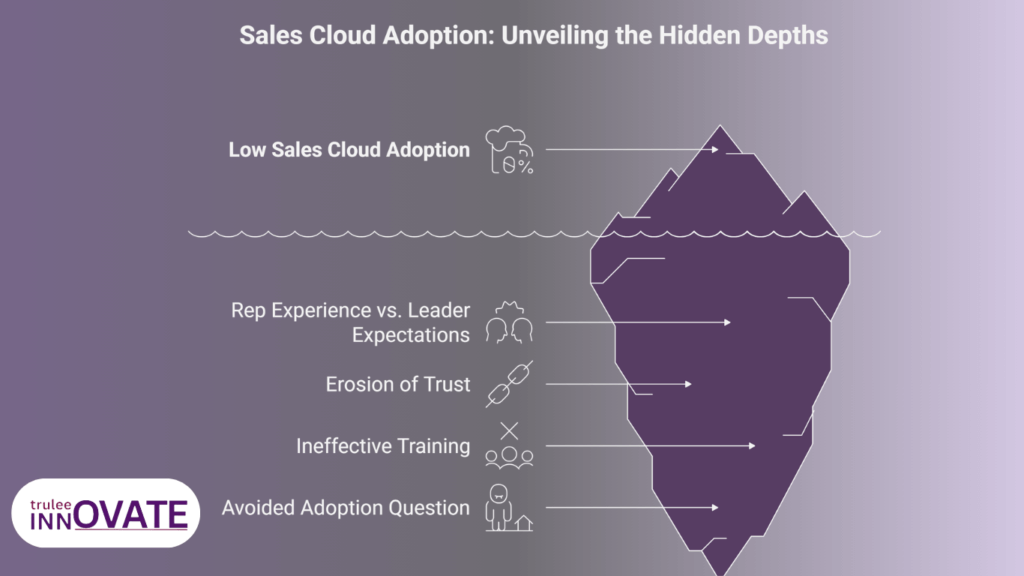
Sales teams don’t reject Sales Cloud because they hate technology. They reject it when it doesn’t help them sell.
This is where many implementations misread the problem. Low adoption is treated as a training issue or a discipline issue. In reality, it’s almost always a design issue.
Sales reps are outcome-driven. If a system slows them down, duplicates effort, or feels disconnected from how they actually close deals, they will work around it. Quietly. Consistently.
That’s how sales cloud implementation failures take root.
What reps experience vs. what leaders expect
Leadership often sees Sales Cloud as a control and visibility layer. Reps experience it as part of their daily workflow. When those two perspectives clash, adoption drops.
Here’s where the mismatch usually happens:
| Leadership Expectation | Sales Rep Reality |
|---|---|
| “This improves visibility” | “This adds extra steps” |
| “It standardizes our process” | “It doesn’t match how I sell” |
| “Data quality is critical” | “I’m entering data twice” |
| “Dashboards show performance” | “The numbers don’t reflect reality” |
Neither side is wrong. They’re just optimizing for different things.
The fastest way to lose trust
Reps lose trust in Sales Cloud when:
- required fields block deal movement without context
- stages change but nothing meaningful has happened
- reports don’t match what’s discussed in pipeline reviews
Once trust is gone, usage becomes performative. Updates happen just before meetings. Notes are vague. Data accuracy erodes.
At that point, the CRM still looks active, but it’s no longer reliable.
Why training alone doesn’t fix adoption
Many teams respond by adding more training sessions. That rarely works.
Training teaches how to use the system.
Adoption depends on why the system feels worth using.
If Sales Cloud:
- saves time
- reduces mental load
- supports better conversations
Reps don’t need to be forced. They adopt it naturally.
If it doesn’t, no amount of training changes behavior.
The real adoption question teams avoid
Instead of asking:
“How do we make reps use Sales Cloud?”
The better question is:
“What part of selling should Sales Cloud make easier today?”
When that answer is clear, adoption stops being a problem to manage and becomes a side effect of good design.
The Cost of Skipping Early Success Metrics
One of the quiet reasons sales cloud implementation failures persist is that teams don’t agree on what success looks like early on.
The implementation goes live. Everyone moves on. And no one can clearly answer whether Sales Cloud is actually helping yet.
That gap is expensive.
What usually gets measured (and why it’s misleading)
In the first few weeks, teams tend to track surface-level indicators:
- number of users logged in
- number of records created
- dashboards loading correctly
These metrics look reassuring, but they don’t tell you whether Sales Cloud is improving selling.
A system can be active and still ineffective.
What should be measured instead in the first 90 days
Early success metrics should answer one simple question:
Is Sales Cloud making selling easier or harder?
That means looking at signals like:
- Are reps updating opportunities without reminders?
- Are pipeline reviews faster and more focused?
- Are fewer deals getting “stuck” without explanation?
These indicators show whether the system is being trusted, not just used.
Here’s a practical way to think about it:
| Vanity Metrics | Meaningful Early Metrics |
|---|---|
| Logins per week | Opportunities updated without follow-up |
| Number of fields filled | Time spent in pipeline reviews |
| Dashboard views | Fewer last-minute data changes |
| Reports generated | Clear ownership at each stage |
When teams skip this step, they miss the moment when small fixes could prevent long-term damage.
Why this leads to long-term failure
Without early feedback loops:
- poor design choices go unnoticed
- rep frustration builds quietly
- leadership assumes resistance instead of friction
By the time the problem is obvious, behavior is already set. At that stage, fixing Sales Cloud feels like “another project” instead of a correction.
That’s how implementations drift from promising to painful.
Types of Sales Cloud Implementation Failures Teams Experience
Sales Cloud implementation failures rarely come from one dramatic mistake. They usually appear as a combination of smaller breakdowns that surface during the first few months of usage. While every organization’s situation is different, most struggling implementations fall into a few recognizable patterns.
Process Failure
This happens when the CRM is configured before the sales process is clearly defined. Pipeline stages exist, but they don’t represent meaningful decision points. Deals move forward because someone updated a field, not because real progress happened in the sales cycle. When Sales Cloud reflects assumptions instead of actual selling behavior, the system quickly loses credibility.
Adoption Failure
Even a well-configured CRM fails if sales teams don’t see value in using it. Adoption problems usually appear when the system adds steps without improving daily workflows. Reps update records only when required, notes become minimal, and activity tracking happens outside the CRM. Over time, Sales Cloud becomes a reporting tool for management instead of a working tool for sellers.
Data Reliability Failure
Accurate reporting depends on consistent data entry. When fields are unclear, optional, or duplicated across objects, data quality drops quickly. Forecast numbers begin to drift away from reality, dashboards stop reflecting real pipeline health, and managers start relying on spreadsheets again. At that point the CRM technically functions, but it no longer serves as the single source of truth.
Customization Failure
Sales Cloud is extremely flexible, which is both its strength and its risk. When teams add automation, validation rules, and custom objects too early, the system becomes harder to use than necessary. Reps encounter unnecessary required fields, workflows trigger at the wrong time, and simple updates take longer than expected. Instead of supporting selling, the system begins to slow it down.
How to Avoid Sales Cloud Implementation Failures
Sales Cloud doesn’t fail suddenly. It fails gradually, through small decisions made too early or not questioned enough.
Teams that succeed tend to do a few things differently:
- they define the sales process before configuring the tool
- they resist over-customization in the early phase
- they design the system around how reps actually sell
- they measure trust and usability, not just activity
When these foundations are in place, Sales Cloud becomes a support system instead of a reporting burden.
This is usually the point where teams realize the issue was never the platform. It was the approach.
If you’re planning a Sales Cloud rollout or trying to fix one that’s already live, these early signals matter more than most teams expect. Getting them right early saves far more effort than trying to correct them later.
One of the most common failure points behind these issues is poor pipeline design. When pipeline stages are created for reporting instead of real selling behavior, adoption drops and trust in the data erodes. A clear sales cloud pipeline setup that reflects how deals actually move is often the difference between early struggle and long term success.
Final Thoughts
Sales Cloud implementations don’t fall apart because teams choose the wrong platform. They fall apart because early decisions lock in friction that no amount of training or reporting can fix later.
When the sales process is unclear, customization is rushed, adoption is forced, and success isn’t measured properly, failure isn’t dramatic. It’s gradual. Quiet. Normalized.
The teams that get this right don’t do anything flashy. They slow down early, design for real selling behavior, and let the system earn trust before expanding it. That’s what keeps Sales Cloud useful long after go-live.
If any of the patterns in this article feel familiar, it’s usually a sign that the approach needs adjusting, not the tool. This is exactly the stage where experience matters more than features.
If you’re planning a Sales Cloud rollout or trying to correct one that’s already live, you can see how we approach Salesforce implementations at TruleeInnovate here:
Salesforce services
No pressure. Just a clearer way to think about getting it right early.
Before you budget for Salesforce implementation, make sure you understand why most implementations fail and how to avoid it — here’s a detailed guide: Sales Cloud Implementation Failures: Why Most Teams Struggle.
FAQ’S
1.Why do most Sales Cloud implementations fail?
Most failures don’t come from the platform itself. They happen because teams rush setup without defining a clear sales process, over-customize too early, and assume training alone will drive adoption. When Salesforce is built before sellers’ workflows are understood, usage drops fast.
2. What are the early warning signs of a failing Sales Cloud implementation?
Common signs include low CRM adoption, deals skipping stages, inaccurate forecasts, and sales reps maintaining data outside Salesforce. These usually appear within the first 60–90 days if the implementation isn’t aligned with real selling behavior.
3. Is Sales Cloud too complex for small or growing teams?
No. Sales Cloud works well for SMBs and startups when it’s implemented with restraint. Problems arise when teams copy enterprise-level setups or enable too many features at once. Simpler configurations drive better adoption early on.
4. Can a failed Sales Cloud implementation be fixed after go-live?
Yes, but it’s harder and more expensive than getting it right initially. Fixing a failed implementation usually requires redesigning the sales process, cleaning data, simplifying customization, and rebuilding trust with the sales team.
5. How long does it take to know if a Sales Cloud implementation is failing?
Most issues surface within the first 90 days. If adoption is forced, reports are questioned, or sales managers rely on spreadsheets instead of Salesforce, those are clear signals that the implementation needs course correction.