
Introduction
Sales Cloud go live is supposed to be the turning point. Instead, for many teams, it’s where things quietly start to fall apart.
Leads stop getting updated. Opportunities sit untouched. Reps work outside Salesforce while leadership wonders why adoption never stuck. These aren’t setup problems — they’re sales cloud adoption issues that surface after go live, when real users meet real workflows.
What this really means is that implementation alone doesn’t guarantee usage. Poor rollout strategy, misaligned processes, and low user buy-in turn Salesforce into a reporting tool instead of a selling system.
In this blog, we’ll break down why Salesforce adoption breaks after go live, the most common Sales Cloud rollout challenges teams face, and how to fix them using proven Salesforce adoption best practices — before CRM adoption problems start costing pipeline and revenue.
Sales Cloud Adoption Issues That Appear After Go Live
Go live is when real usage begins, and that’s when the cracks start to show. Teams often assume low adoption means users are resistant or untrained. In reality, most sales cloud adoption issues appear because Salesforce doesn’t fit naturally into how sales teams work day to day.
Below are the most common issues that surface immediately after go live and quietly derail Salesforce user adoption.
Salesforce Is Used for Reporting, Not Selling
Sales reps update Salesforce only when they are forced to. Deals are worked in emails, spreadsheets, or personal notes, while Salesforce becomes a place to log information after the fact. This disconnect turns Salesforce into a management reporting tool instead of a system that helps reps close deals.
When Salesforce is not essential to selling, adoption drops fast.
Sales Processes Feel Overcomplicated to End Users
After go live, reps are often faced with:
- Too many deal stages
- Mandatory fields that don’t add value
- One pipeline forced across different sales motions
These sales cloud rollout challenges slow reps down and create frustration. The result is predictable. Users look for shortcuts, skip updates, or abandon Salesforce altogether.
Poor Go-Live Rollout and No Follow-Up Reinforcement
Many teams treat go live as the finish line. Training happens once, access is granted, and then support disappears. Without reinforcement, feedback, and continuous improvement, crm adoption problems start to grow within weeks.
Salesforce adoption requires ongoing guidance, not a one-time launch.
Why Salesforce User Adoption Drops Within the First 90 Days
The first three months after go live decide whether Salesforce becomes part of daily selling or slowly fades into the background. Most teams see usage peak early and then decline, not because users dislike Salesforce, but because the system fails to support them when real pressure hits.
Here are the core reasons Salesforce user adoption drops within the first 90 days.
Sales Reps Do Not See Immediate Personal Value
After go live, sales reps are expected to update opportunities, contacts, and activities. If Salesforce only feels like extra work with no visible benefit, adoption drops fast. Reps care about closing deals, not maintaining a system.
When Salesforce does not help them prioritize deals, move opportunities forward, or win faster, it becomes optional in their minds.
Managers Do Not Use Salesforce to Coach or Inspect
Salesforce adoption is driven top down. When managers do not use Salesforce in pipeline reviews, forecast discussions, or coaching conversations, reps quickly learn that accurate data does not matter.
If performance conversations happen outside Salesforce, user adoption inside Salesforce collapses.
Early Friction Is Ignored Instead of Fixed
The first 90 days surface real crm adoption problems. Fields that slow users down. Stages that do not match reality. Reports that do not answer key questions.
When this friction is ignored, users stop trusting the system. Once trust is lost, adoption becomes very hard to recover.
Salesforce Becomes a Compliance Tool Instead of a Sales Tool
When usage is enforced only through reminders or leadership pressure, Salesforce starts to feel like surveillance instead of support. This creates resistance, not engagement.
Strong salesforce adoption best practices focus on enablement and usefulness, not policing.
How to Fix Sales Cloud Adoption Issues After Go Live
Fixing sales cloud adoption issues after go live requires changing how Salesforce supports daily sales work, not adding more rules or pressure. Adoption improves when users see Salesforce as a system that helps them sell, not one that slows them down.
Here’s what actually works.
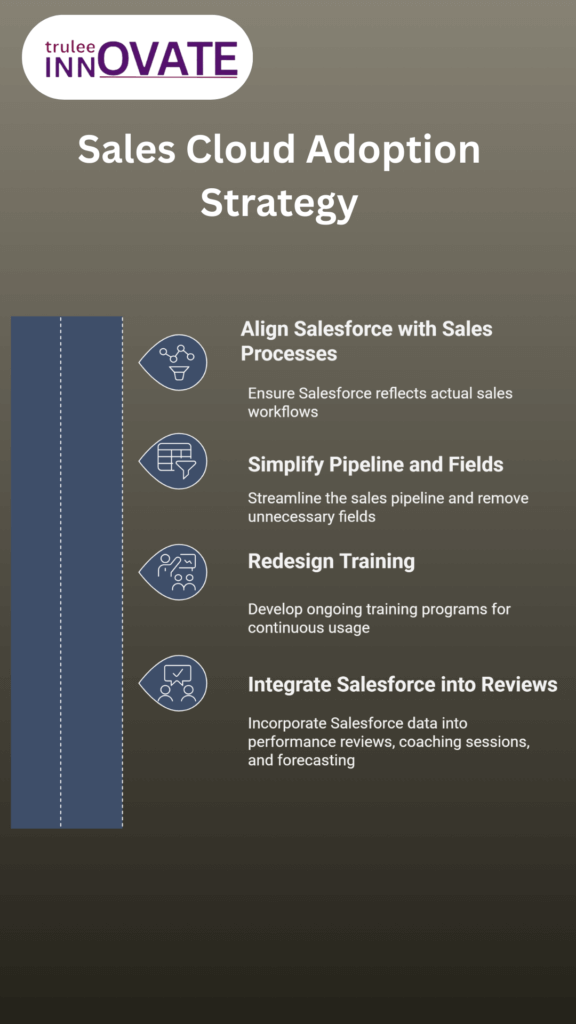
Align Salesforce With How Sales Teams Really Work
Start by reviewing how deals move in reality. Sales stages, fields, and required steps should reflect real selling behavior, not an idealized process designed in isolation. When Salesforce mirrors how reps sell, updates feel natural instead of forced.
This alignment removes friction and improves salesforce user adoption immediately.
Simplify the Pipeline and Remove Low Value Fields
Complex pipelines and excessive data entry are major sales cloud rollout challenges. Every required field should have a clear purpose. If it does not help forecast, coach, or move a deal forward, it should not be mandatory.
A simpler pipeline leads to higher data quality and better CRM adoption.
Redesign Training for Ongoing Usage, Not Just Go Live
One time training does not drive long term adoption. Training should be role based, practical, and tied to real deals. Users need to learn how Salesforce helps them today, not what every feature does.
Ongoing enablement is one of the most overlooked salesforce adoption best practices.
Make Salesforce Central to Reviews, Coaching, and Forecasting
Salesforce adoption improves when managers rely on it for decision making. Pipeline reviews, forecast calls, and performance discussions should happen inside Salesforce.
When Salesforce becomes the source of truth, user behavior follows.
When Sales Cloud Adoption Issues Signal the Need for Expert Help
Some sales cloud adoption issues can be fixed with small adjustments. Others are symptoms of deeper problems in process design, data structure, or rollout strategy. Knowing the difference matters, because forcing adoption on a broken system only increases resistance.
Here are clear signs that internal fixes are no longer enough.
Adoption Improves Briefly, Then Drops Again
If usage spikes after training or leadership intervention but falls within weeks, the problem is not discipline. It is structural. Salesforce is not supporting how the team sells, and users revert to old habits once pressure fades.
This pattern is a common indicator of unresolved crm adoption problems.
Sales Data Exists, But Leadership Does Not Trust It
When forecasts feel unreliable and pipeline reviews turn into data correction sessions, adoption has already failed. Teams may be using Salesforce, but not in a consistent or meaningful way.
Low trust in data is one of the strongest signs that salesforce user adoption needs deeper intervention.
Internal Teams Are Unsure What to Fix Next
Sales operations teams often sense that something is wrong but lack clarity on where the breakdown is happening. Changes become reactive and inconsistent, creating more confusion for users.
At this stage, applying salesforce adoption best practices without experienced guidance usually leads to more complexity, not improvement.
Fixing Sales Cloud Adoption Issues Before They Impact Revenue
Sales cloud adoption issues rarely stay contained. When Salesforce is not fully adopted, pipeline visibility drops, forecasts become unreliable, and leadership decisions are made on incomplete data. Over time, this directly impacts revenue performance.
The key is acting early. Teams that address adoption issues soon after go live can recover usage, rebuild trust in data, and turn Salesforce into a system that supports selling instead of slowing it down.
Strong Salesforce adoption is not about enforcing compliance. It is about aligning process, training, and leadership behavior so Salesforce becomes the natural place where sales work happens.
If adoption is already slipping, the cost of waiting is higher than the cost of fixing it.
Frequently Asked Questions
1. Why do sales cloud adoption issues appear after go live
Most sales cloud adoption issues appear after go live because real users encounter real workflows. Salesforce may be technically implemented, but it often does not match how sales teams actually work day to day.
2. How long does it take to see Salesforce adoption problems
Salesforce adoption problems usually surface within the first 30 to 90 days after go live. This is when initial training fades and users revert to familiar tools if Salesforce feels slow or disconnected from selling.
3. What is the biggest reason Salesforce user adoption fails
The biggest reason Salesforce user adoption fails is lack of perceived value for sales reps. If Salesforce feels like extra work without helping close deals, users avoid it.
4. Can Salesforce adoption issues be fixed without reimplementation
Yes, many sales cloud adoption issues can be fixed without a full reimplementation. Simplifying processes, improving training, and aligning Salesforce with actual sales behavior often restore adoption.
5. How do managers impact Salesforce adoption
Managers play a critical role in Salesforce adoption. When they use Salesforce for coaching, pipeline reviews, and forecasting, reps follow. When they do not, adoption drops quickly.
6. What are Salesforce adoption best practices after go live
Salesforce adoption best practices after go live include ongoing training, role based workflows, leadership involvement, and continuous feedback from users to improve the system.